Review and Comparison of the Best Video Converter Software with Features and Pricing. Select the from this list of top paid and free online video converter tools to convert any videos quickly and easily:
What is a Video Converter?
Video conversion tools allow you to convert a video from one format to another. The first commercially successful video format was Quad and it was introduced in 1956. Over subsequent decades, people introduced various other video formats.
Whether you work at a professional movie studio or edit home movies, you may require converting raw video files from one format to another. There are dozens of conversion tools available online. If you are looking for the best converter software, then you are in the right place.
Here, we will answer common questions regarding video conversion tools and provide a review of the best tools available online.
Table of Contents:
- What’s the Best Video Converter
- List of Best Free and Paid Video Converters
- Comparing Top Online Video Converter Software
- #1) Winxvideo AI
- #2) Leawo Video Converter
- #3) ByClick Downloader
- #4) VideoProc
- #5) Aiseesoft Video Converter Ultimate
- #6) Wondershare UniConverter
- #7) AVS Video Converter
- #8) PowerDirector 365
- #9) Movavi Video Converter
- #10) NCH Prism
- #11) Any Video Converter
- #12) Freemake Video Converter
- #13) HandBrake
- #14) DivX Converter
- #15) Online-Convert
- #16) Gihosoft Free Video Converter
- #17) DVD VideoSoft Free Video Converter
- #18) iDealshare VideoGo
- #19) Eassiy Video Converter Ultimate
- #20) WorkinTool Video Editor
- #21) FonePaw Video Converter Ultimate
- #22) iTubeGo
- #23) DeepSwap
- Frequently Asked Questions
- Conclusion
What’s the Best Video Converter

Speed and ease of use are also important considerations. Lastly, the tool should meet your specific budget. All these factors will determine which is the best tool for you.
List of Best Free and Paid Video Converters
- Winxvideo AI
- Leawo Video Converter
- ByClick Downloader
- VideoProc
- Aiseesoft Video Converter Ultimate
- Wondershare UniConverter
- AVS Video Converter
- PowerDirector 365
- Movavi Video Converter
- NCH Prism
- Any Video Converter
- Freemake Video Converter
- HandBrake
- DivX Converter
- Online-Convert
- Gihosoft Free Video Converter
- DVD VideoSoft Free Video Converter

Comparing Top Online Video Converter Software
| Video Converter Software | Platform | Price | Features | Best For | Ratings ***** |
|---|---|---|---|---|---|
| Winxvideo AI | Windows 11 (64 bit), Windows 10, Windows 8/8.1, Windows 7 | Free + Premium Premium version cost $29.95 (Instead of $69.95) after 50% limited time disc. | Video Enhancer, Video Converter, Compressor, Recorder, & Editor, It uses AI & GPU acceleration technology. | Commercial ad studios, freelancers, and home video editing. |  |
| Leawo Video Converter | Windows & Mac | Starts at $29.95 | Built-in media player, 2D to 3D video converted, etc. | User-Friendly HD video conversion. | |
| ByClick Downloader | Windows, Chrome, Firefox, IE, and Edge browsers. | Free download, Premium: $19.99. | Download videos in any format, select quality of videos, tracking of downloads. | Downloading videos from any website and in any format. | |
| VideoProc | Windows & Mac | Free version: Allows you to convert short video audio file for free. Full version: Starts from 29.95 | • Convert any video audio DVD to 420+ output. • Convert and edit 4K/8K/large videos speedily. • Upscale & downscale videos; adjust quality. • Download video, record screen; batch process. | Beginners, Educators, Gamers, live enthusiasts, Sports lovers, etc. | |
| Aiseesoft Video Converter Ultimate | Windows & Mac. | It starts at $25 for 1 month 1 PC. | Convert any video, filters & basic effects, subtitles & audio tracks, etc. | All-in-one solution to convert, edit, & compress videos. | |
| Wondershare UniConverter | Windows and MacOS | $45.95 (1 Year License) $69.95 (Lifetime License for 1 PC) Free Limited version trial. | Record screen activity with audio narration, Burn video discs for viewing on consoles and mobile devices, VR converter and Gif maker, Batch video conversions, Supports +1000 file formats. | Small to large businesses and freelancers. | |
| AVS Video Converter | Windows | Free | Hardware acceleration support, Convert videos for mobile devices, Burn Blu-ray and DVD videos, Automate conversion process using command line mode, Share converted videos online | Freelancers and small studios | |
| PowerDirector 365 | Windows, Mac, Android, & iOS. | Free version, Price starts at $19.99/month. | Video Collage Designer, Blending Mode, Green Screen Anywhere, etc. | Professional video editing. | |
| Movavi Video Converter | Mac and Windows | $49.95 | Hardware acceleration, 200+ presets, 180+ formats supported | Small studios and freelancers |  |
| NCH Prism | Windows and MacOS | $33.24 (1-Year License) $50 to $70 (Lifetime License) Free Limited version trial. | Convert to popular video formats, Add video effects, Split or trim videos, Direct DVD converter, Batch conversion. | Small and medium-sized studios. |  |
| Any Video Converter | Windows | Basic: Free Premium: $59.95 | 4K Video conversion, NVIDIA NVENC, Accelerated encoding, HVEC / H.265 conversion, Video editing, Extraction of audio from CD/DVDs. | Commercial ad studios, freelancers, and home video editing. | |
| Freemake Video Converter | Windows | Free | Support 500+ formats, Edit and burn videos to DVDs, Download online videos, Create photo slideshows. | Freelancers, and home video editing. | |
| HandBrake | Windows, MacOS, and Linux. | Free | Batch conversion, Hardware acceleration, Manual and automatic scaling, deinterlacing, detelecine, and cropping. | Small studios and freelancers. | |
| iTubeGo | Windows, Mac, and Android. | It starts at $9.95 per month for 1PC. Free plan available. | Audio/Video converter, bulk downloading, protect video privacy, etc. | Audio & video conversion capabilities. | |
| DeepSwap | Web-based | Starts at $9.99/month | AI photo quality enhancer, Meme and GIF generator, AI Background Remover | Personal use, small to large businesses. | |
Detailed reviews:
#1) Winxvideo AI
Best for: Commercial ad studios, freelancers, and home video editing.
Pricing: Free + Premium. Premium version cost $29.95 (Instead of $69.95) after limited time discount. It offers the solution with three pricing plans Lifetime License/1PC $69.95, 1Year License/3PCs $39.95, Family License/5PCs $109.90. Use the exclusive Winxvideo AI coupon code as mentioned below:
Winxvideo AI Lifetime license
- Discounted Price: $29.95
- Coupon Code: WXVLF40
Winxvideo AI 1 Year license
- Discounted Price: $19.95
- Coupon Code: WXV1Y20
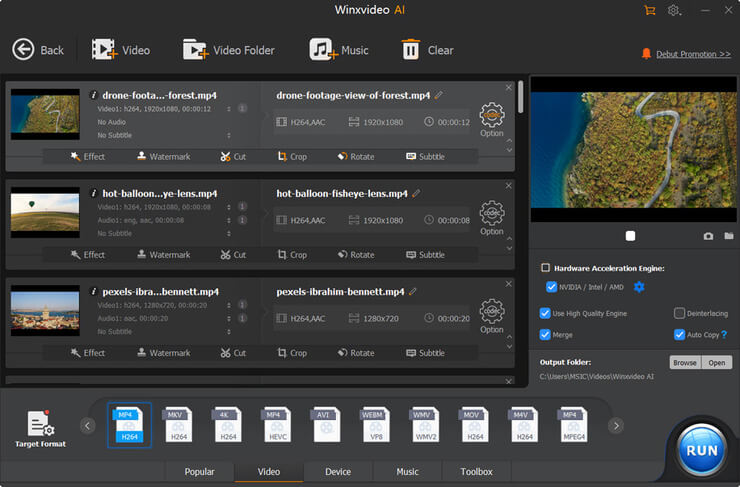
Winxvideo AI is a powerful and multifunctional video tool. This software assists users to convert any 4K, HD video to MP4 (HEVC/H.264), MKV, AVI, iPhone, iPad, Android and 420+ output profiles. Take advantage of AI and GPU acceleration technology and get high quality videos and images at a fast speed.
It is an all-in-one Windows video processing toolkit that includes video/image enhancer, video converter, compressor, recorder, and editor.
Features:
- Winxvideo AI has 3 AI modes to enhance the video and those are AI upscaling, AI stabilization, and AI frame interpolation.
- With the help of this solution, you will be able to enhance low-resolution images by 400%
- Leverage the GPU acceleration to convert the video format.
- Reduce 4K/HD video file size by 90%.
- Edit, cut, crop, merge videos in simple clicks.
- Download online 1080P and 4K videos from 1000+ sites.
Cons:
- Lacks features such as burning videos to DVD, text narration.
Winxvideo AI is an easy but versatile program. It has used GPU acceleration tech ot provide 47X real-time fast video conversion speed. You can easily convert 4K and 8K video to various formats such as MP4, HEVC, H.264, MKV, MOV, AVI, WMV, MPEG, MP3, AAC, etc. Video file compression and editing are also available in the program. It has an intuitive interface and the operations are easy.
#2) Leawo Video Converter
Best for user-friendly HD video conversion with various features like batch HD video conversion.
Pricing: It is available as a Single-user 1-Year Update License for $29.95 per year and a Single-user Lifetime Update License for $39.95. It can be tried for free.

Leawo Video Converter is a tool for processing common and HD videos and converting them to any pop video and audio format. It has functionalities for creating 3D movies, uploading videos to YouTube, and many more.
It supports over 180 formats for the conversion of video and audio. The tool will let you apply the special effects to the output.
Features:
- Leawo Video Converter provides the features for creating 3D videos from common and HD videos with support for six different 3D effects.
- It has an internal video editor to customize HD videos.
- It has professional HD video editing features and advanced video parameter settings.
- It has functionalities for trimming or cropping HD videos, adding watermark, adding video effects, etc.
Cons:
- No such cons to mention.
Verdict: The tool will help you watch HD movies on various devices like iPhone, iPad, Galaxy S5, etc., and that too without losing the quality. It has excellent 2D and 3D conversion abilities. It provides a user-friendly HD video converting experience.
#3) ByClick Downloader
Best for downloading videos from any website and in any format.
Pricing: ByClick Downloader is available to download for free. Its premium version is available for $19.99.

ByClick Downloader is a platform for backing up the videos from any platform. It supports more than 40 sites like YouTube, Dailymotion, Facebook, etc. to back up the videos. You can download the videos in HD and 4K quality.
Features:
- ByClick Downloader lets you download videos in any format and quality.
- It lets you track the download.
- Entire YouTube Playlists and channels can be downloaded with the help of this tool.
- You can download YouTube subtitles, Instagram user photos, etc.
- It offers many more features like multiple downloads.
Cons:
- No such cons to mention.
Verdict: ByClick Downloader has a one-click download mode and provides the facility of downloading the videos directly from the web browser. It has the capabilities to download private YouTube and Facebook videos.
#4) VideoProc
Best for Beginners, Educators, Gamers, live enthusiasts, Sports lovers, etc.
Price: The trial version allows you to convert a short-length video audio file less than 5 mins. The full version starts from $29.95. 30-days money-back guarantee is available.
=> Use Coupon “PROMO” at Checkout to save 65% on Lifetime Full License

VideoProc is a simple yet powerful video/audio/DVD converter that also comes with strong video editing, downloading and recording features. It will perform these functions at a fully accelerated speed, and skilled at processing 4K/8K/large videos without freezing. It offers a free solution for Windows and Mac platforms.
Features:
- Support almost all videos audios as input, incl. 370+ codes; Support 4K/8K/HD/3D/VR videos.
- Convert any videos audios DVDs to 420+ formats and devices, e.g. H264 to H265 (HEVC), MKV to MP4.
- Allow batch conversion; Upscale HD/SD to 4K, Downscale 4K to 1080p/720p. No.1 fast processing speed.
- Provide the functionalities to process the videos like cutting, merging, cropping, rotating, adding subtitles, giving effects, stabilizing video, removing noise, making GIFs, adding Watermark, etc.
- Download videos audios from 1000+ online sites, incl. YouTube. Capture desktop and mobile screen in 3 modes, make PIP video, etc.
Further reading => How to use HitPaw Watermark Remover Tool
Verdict: VideoProc is the only full GPU accelerated video converting & editing software. It provides you 47x real-time faster processing speed. It is your ultimate choice to convert and edit 4K/large videos.
#5) Aiseesoft Video Converter Ultimate
Best for all-in-one video converter with support for 1000 formats.
Pricing: Aiseesoft Video Converter Ultimate is available with three licensing options, 1 Month License ($25 for 1 PC), Lifetime License ($55.20), and Multi-user License ($119, lifetime license for 5 PCs). A free trial is available to download.

Aiseesoft Video Converter Ultimate is an all-in-one solution for Windows and Mac platforms. It has the capabilities to convert, edit, and compress videos as well as audios.
It supports 1000 formats for editing, compressing, and converting. It also offers a tool Music Movie Maker for users with higher demand and less time & skills. It will help you to create cool videos quickly.
Features:
- Aiseesoft Video Converter Ultimate has a built-in video enhancer technology that maintains the original quality to the maximum.
- It has a lot of video editing filters.
- It provides a facility to add external subtitles to your video.
- It offers the features to add a 3D effect to your video.
- It has many more features like adding watermarks, crop & rotate, trimming & merging video clips, editing ID3 info, etc.
Cons:
- Absence of built-in functionality of burning the converted videos to DVD.
Verdict: Aiseesoft Video Converter Ultimate has powerful features to convert any video. It contains functionalities from the basic video/DVD converting to the advanced one. It offers flexible licensing options.
Best for: Small to Large businesses and Freelancers.
Pricing: $45.95 (1 Year License) | $69.95 (Lifetime License) | $99.95 (Family package) | Free Limited version trial.

WonderShare UniConverter is a multi-purpose and versatile video conversion tool for Windows and MacOS operating systems. The software can burn and transfer video discs to Android, iOS, XBOX, VR, and other formats. With this software, you can also download and convert audio and video files available online.
Moreover, the software allows you to record desktop screen activity with audio. A great thing about this video conversion tool is that it supports 4K/UHD video editing. In addition, it can repair video metadata so that you can retrieve damaged videos stored on discs.
Features
- Record screen activity with audio narration.
- Burn video discs for viewing on consoles and mobile devices.
- VR converter and GIF maker.
- Batch video conversions
- Supports +1000 file formats.
Cons
- No Audio normalization feature.
- The user interface can be confusing.
Verdict: WonderShare UniConverter is packed with a lot of great features. The software supports a large number of file formats. You can do just about anything you want with your videos using this nifty tool.
#7) AVS Video Converter
Best for: Freelancers and small studios.
Price: Free

AVS Video Conversion software is another simple yet powerful video conversion tool for Windows. The software can convert videos to different formats. This software can utilize hardware acceleration by allowing you to convert full HD and 4K UHD videos faster.
Features
- Hardware acceleration support
- Convert videos for mobile devices.
- Burn Blu-ray and DVD videos
- Automate the conversion process using command line mode.
- Share converted videos online.
Cons
- No advanced features such as adding audio and text narrations.
Verdict: AVS video converter allows you to convert a large number of audio files quickly. The software is great for power users who want to batch process files automatically. There are dozens of presets that allow you to easily convert videos to popular mobile and console devices.
#8) PowerDirector 365
Best for professional video editing.
Pricing: PowerDirector Essential is available to download for free. PowerDirector 365 offers monthly ($19.99) as well as annual plan ($51.99). PowerDirector 365 Business price starts at $16.67.

PowerDirector 365 – is a free video editing software offered by CyberLink. It supports Windows, Mac, Android, and iOS platforms. It offers a solution with cost-effective and flexible plans.
PowerDirector 365 Business is a powerful tool that can streamline your marketing and offers tools like Ad Designer. Both tools have professional editing capabilities.
Features:
- Video Collage Designer, PiP Designer, Mask Designer.
- Customizable text and effects.
- Green Screen Anywhere
- Blending Mode, etc.
Cons:
- As per reviews, its interface is not intuitive.
Verdict: PowerDirector 365 can be used for projects of all sizes. It offers best in class editing tools to cut, refine, add effects, and publish. It has a streamlined user interface and you will be able to create compelling content by adding new effects.
#9) Movavi Video Converter
Best for: Small studios and freelancers.
Price: $49.95 | 7-day trial

[image source]
Movavi converter is a Windows video file converter. The file can convert 180+ video and audio formats. This app also supports 4K Ultra video editing and conversion.
You can also select over 200 presents for optimizing video files. In addition, you can make GIF images from your videos. The software supports high conversion speed due to its hardware acceleration feature.
Features
- Fast conversion due to hardware acceleration.
- Variable bitrate
- Supports 180+ formats
- 200+ presents
- Extract soundtracks from videos.
Cons
- Lacks features such as burn videos to DVD and download online videos.
Verdict: Most people have praised the Movavi video converter for its quick video conversion. The program is one of the fastest converters suitable for converting feature-length films. The software does lack certain features but makes up for it due to its strong conversion and optimizing features.
#10) NCH Prism
Best for: Small and Medium-sized studios.
Price: $33.24 (1-Year License) | $50 to $70 (Lifetime License) | Free Limited trial version.

NCH Prism is a simple-to-use video conversion app for Windows and MacOS. This app allows you to quickly convert a large number of videos. You can convert your video to and from the most popular video formats. In addition, you can also publish videos directly to DVD.
The software can convert video files to formats that are compatible with Android phones, iPhones, iPod XBOX, and PlayStation devices.
Features
- Convert to popular video formats.
- Add video effects
- Split or trim videos
- Direct DVD converter
- Batch conversion
Cons
- No ability to bypass DVD copy protections.
- Supports limited video formats.
Verdict: NCH Prism is an easy-to-use software that can convert videos to popular formats. The software allows you to convert and edit videos. This tool is generally geared towards freelancers and small studios. Individuals who want to edit simple home videos can download and use the free version of the software.
Website: https://www.nchsoftware.com/prism/index.html
#11) Any Video Converter
Best for: Commercial ad studios, Freelancers and Home video editing.
Price: Basic: Free | Premium: $59.95

Any Video Converter is one of the best free video converter tools online. The software supports conversion to over 100+ video formats. You can also save videos with 100% quality.
A unique feature of the software includes NVIDIA NVENC accelerated encoding. Other notable features of this software include extracting audio from videos, downloading videos from video streaming sites, and burning videos directory to DVD or AVCHD.
Features
- 4K Video conversion
- NVIDIA NVENC accelerated encoding.
- HVEC / H.265 conversion
- Video editing
- Extraction of audio from CDs/DVDs.
Cons
- It takes a long time to convert videos.
Verdict: Any Video Converter is a great tool for editing and converting small videos. The software can take a long time to process and convert videos. Thus, the app is not suitable for studios or freelancers who want to convert videos with +1 hour of content.
Website: https://www.any-video-converter.com/products/for_video_free/
#12) Freemake Video Converter
Best for: Freelancers and home video editing.
Price: Free.

[image source]
FreeMake is a freemium video conversion software for Windows. The software can allow you to convert videos, burn DVDs, and create photo slideshows. A great thing about this tool is that it supports over 500+ formats. You can also pull videos from YouTube, Dailymotion, and other video-sharing sites.
The application supports video conversion for most mobile devices including smartphones, iPods, consoles, and even smartwatches.
Features
- Support 500+ formats
- Edit and burn videos to DVDs.
- Download online videos
- Create photo slideshows
Cons
- Takes a long time to convert large videos.
- Some features require online activation.
Verdict: This converter supports conversion to a large number of formats. Similar to Any Video Converter, this software is suitable for processing small-length videos. The software has a simple interface that is easy to understand.
Website: https://www.freemake.com/free_video_converter
Further Reading => Read This Review of AVCLabs Video Enhancer AI
#13) HandBrake
Best for: Small studios and freelancers.
Price: Free

HandBrake is yet another free video converter tool that is compatible with Windows, Mac OS, and Linux. The software can convert videos to popular formats including H.264/H.265, MPEG-2, MPEG-4, Theora, and VP8/9.
The open-source transcoder uses third-party libraries such as x265, FFmpeg, and libvpx to convert videos. The most compelling reason to use the software includes quick processing due to excellent hardware acceleration support.
Features
- Batch conversion
- Hardware acceleration
- Manual & automatic scaling, deinterlacing, detelecine, and cropping.
Cons
- Limited video file format support.
Verdict: HandBrake is a freemium multi-platform video conversion tool. The software can convert videos to only a handful of formats. However the conversion process is quick due to the hardware acceleration feature. The software can meet the needs of individuals who want to edit home videos.
Website: https://handbrake.fr/
#14) DivX Converter
Best for: Freelancers and website owners.
Price: Basic: Free | Pro: $19.99

DivX Converter is a Windows and MacOS video conversion tool with great features. The software can convert large videos to small sizes without a noticeable loss in quality.
This software can also make backup copies of non-encrypted DVDs. The advanced Pro version of the software features a lot of advanced options such as Wavefront Parallel Processing, B-Frames, and Target Quantizer.
Features
- Convert videos
- Trim, crop, and rotate videos.
- Custom watermark
- Advanced features include Wavefront parallel processing, logs, B-frame, and Target Quantizer.
- Cloud Connect and Backup DVD feature.
Cons
- DivX format results in a significant loss of video quality.
Verdict: DivX converter is a basic tool with lots of great features. The software supports a higher degree of compression when compared to other video conversion apps. Converting videos to Divx format makes them suitable for sharing videos online.
#15) Online-Convert
Best for: Freelancers and home video editing.
Price: $7 – $49 / month for files between 200 MB and 1GB | $5 one-day pass with 800 MB limit | Free for 100 MB file limit.

Online-Convert is a versatile online converter that supports conversion to popular video types including WMV, Mpeg, 3GP, AVI, FLV, MKV, and MOV formats. You will find the video encoding tool adequate for converting home video files. The easy-to-use tool can quickly convert one file format to another.
Further reading =>> Best tools to convert MOV to MP4
Apart from video conversion, this versatile multi-platform tool can convert eBook, audios, documents, images, and archives. The online tool can also convert videos for display on video-sharing sites and different devices.
Features
- Convert to popular video formats.
- Support conversion to different video-sharing site formats.
- Convert videos for compatibility with different devices.
- Supports image, ebook, archive, and audio format conversion.
Cons
- Limits for file sizes.
- Large file conversion requires a subscription.
Verdict: Online-covert supports a wide range of formats. The software is great for freelancers and individuals who want to edit homemade videos. The best thing about this app is that you can use it in any internet-connected device using a web browser
#16) Gihosoft Free Video Converter
Price: Free | $39.95 (1-PC license) | $179.75 (5-PC license).

Gihosoft is another nifty video conversion tool for Windows and MacOS users. The free software can convert your videos to WMV, MP4, AVI, MKV, MOV, FLV, SWF, WEBM, ASF, 3GP formats.
You can also edit and enhance your videos with audio narrations and filters. The notable feature of this tool is its ability to burn videos to blank DVDs.
Features
- Conversion to popular video formats.
- Burn Videos to DVDs
- Cut and crop videos.
- Download YouTube videos
- Enhance videos with subtitles, audio narrations, and filters.
Cons
- It does not support advanced features.
Verdict: Gihosoft can easily serve the needs of freelancers and individuals who want to edit home videos. Remember that the free version has Gihosoft branding. Consider purchasing the Pro version if you don’t want the company’s branding on your videos.
The Pro version also supports the download of YouTube subtitles and transfer to mobile devices.
#17) DVD VideoSoft Free Video Converter
Best for: Freelancers and small studios.
Price: Free

DVDVideoSoft is a free app for Windows that can convert videos to HD-quality videos. The software supports 40+ video file formats including MPG, DIVX, IVF, OGX, MKV, and others. The software has a simple and uncluttered interface that makes it easy to use.
Features
- Convert videos to 40+ popular formats.
- Merge two files.
- Preset editor to edit audio and video.
Cons
- No advanced features such as adding audio and text narrations.
Verdict: DVD VideoSoft is a simple converter that has one sole purpose i.e. to convert video files. The software does not allow you to add subtitles or audio narrations. But if you want to convert video files only, then this is the software for you.
Further Reading => Most Popular Closed Captioning Services of the Year
Best for Beginners, Individuals, home video editing, and small to large businesses.

iDealshare VideoGo is an all-in-one video converter, audio converter, player, and editor. It can directly play media files directly without conversion. It can also convert between various video formats, between various audio formats and convert video to audio format. It also helps with some basic editing of the video and audio files.
Features:
As a video converter, it can convert almost all kinds of video files including 4K, HD, or SD Video in WTV, DVR-MS, DAV, WMV, ASF, Apple ProRes, AVCHD, ASX, AVI, XMV, DV, HDV, DV-AVI, DivX, Xvid, MKV, FLV, F4V, SWF, MXF, MOD, MVI, OGM, WebM, VP8, Theora, OGV, 3GP, 3G2, 3GPP, 3GPP2, MP4, MPG, MPEG-1, MPEG-2, MPEG-4, MJPEG, MJPG, H.263, H.264/AVC, H.265/HEVC, RM, RMVB, MOV, M4V, QT, DAT, 720p/1080p, MTS, M2TS, M2T, TS, TOD, TP, R3D, Fraps video, BIK, Flip movies, AMV, TRP, SMV, IFV, etc.
As an audio converter, it can convert various audio files formats like OPUS, Vorbis, AAC, AC3, DTS, ALAC, OGG, OGA, MP3, WAV, FLAC, WMA, XWM, 3GA, M4A, M4B, MKA, RA, RAM, APE, AU, AUD, AIFF, AIFC, CAF, MPC, QCP, VOC, VOX, GSM, DSS, etc.
As a player, it can directly play all kinds of video and audio files without conversion on Windows and Mac. As an editor, it can do some basic editing like trim, cropping videos, merging several files into one, rotating videos, adding effects to videos, adding, removing, or extracting subtitles from videos, compressing file size, etc.
Cons:
- No such cons to mention.
Verdict: iDealshare VideoGo is easy to use. It supports batch conversion. It can convert with high-output video and audio quality. It can convert video and audio files for iPhone, iPad, Android, Samsung TV, Smart TV, PSP, Xbox, QuickTimes, iTunes, iMovie, Adobe Premiere, Final Cut Pro, Windows Movie Maker, etc.
#19) Eassiy Video Converter Ultimate
Best for Professional and casual editors.
Price:
- Annual Plan: $39.99
- Perpetual Plan: $55.99
- Family Plan: $149.99
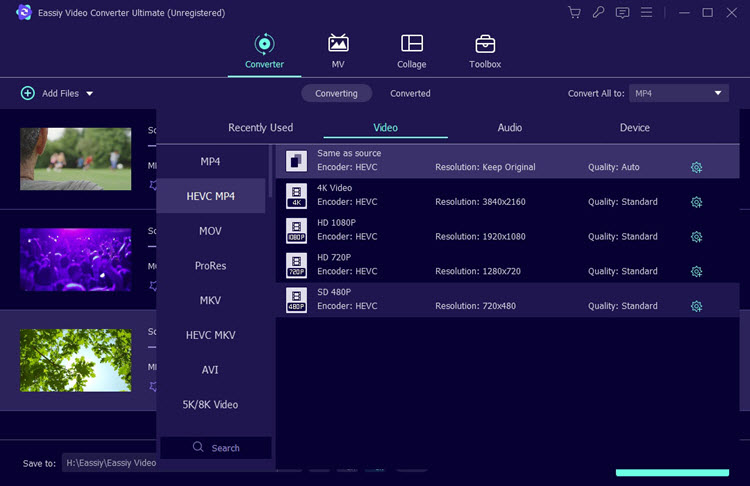
With Eassiy, you get more than 20 multi-media tools to convert, edit, and compress videos. The software can be used to convert a variety of video and audio file formats. You can rely on Eassiy to convert multiple videos at once.
The software facilitates conversion without compromising the original video’s quality. It can easily convert 4K, 8K, and UHD videos without encoding or decoding them. Plus, the added GPU acceleration allows Eassiy to covert videos at a speed that is 60 times faster than most traditional video converters out there.
Features:
- Multi-Core Processor Optimization
- Batch Video Conversion
- Lossless Video conversion
- Convert video to 8K resolution
Cons:
- 1 license per PC unless you are taking the family plan.
Verdict: At a speed that is 60 times faster than average, you can convert a plethora of video and audio file formats in Eassiy without compromising the file’s original quality. It is also one of those rare converters that can boost a video’s resolution to 8K. As such, Eassiy has our highest recommendation.
#20) WorkinTool Video Editor
Best for both beginners and professionals.
Pricing: $10.95 (Monthly) | $29.95 (1 Year License) | $39.95 (Lifetime License)
Free limited version trial.

WorkinTool Video Editor is a powerful and comprehensive video editor and screen recorder designed for both beginners and professionals. Simple and practical video editing features, including a screen recorder, video converter, text-to-audio converter, and more. It brings you the best service with convenience in editing videos.
Features:
- Friendly interface
- No Watermark
- Multiple editing templates
- Rich online tutorials
- High-quality output
Cons:
- Currently Windows only
Verdict: WorkinTool Video Editor is an all-in-one video converting software. It sprinkles a little magic to record, split, merge, cut, flip, and convert. VidClipper is equipped with more than 1000 useful templates, including 100+ stylish texts, 60+ filters, 300+ transitions, 70+ overlay effects, 200+ elements, and 600+ sound effects.
Now STH users can get 50% off. Use this Discount Code: video-coupon
#21) FonePaw Video Converter Ultimate
Best for individuals, home video editing, and small to large businesses.
Pricing: Its free trial is available to download. Its single-user license is available for $39.95 and a family license for $69.95. It offers a 30-day money-back guarantee.

FonePaw Video Converter Ultimate is a multifunctional application. It offers functionalities for converting, editing, and playing videos, a DVD, and audio. It converts at a fast speed and provides higher quality. FonePaw has tools of video & audio converter, merger, and editor. It contains a video compressor, DVD Ripper, and Video Player.
Features:
- FonePaw Video Converter Ultimate makes use of NVIDIA’s CUDA and AMD APP acceleration technology to provide conversion at a fast speed.
- It can convert HD and SD videos at a fast speed and with high quality by decoding and encoding videos on the CUDA-enabled graphics card.
- It will let you convert one as well as multiple videos simultaneously.
Cons:
- No such cons to mention.
Verdict: FonePaw Video Converter Ultimate is an all-in-one video converting software. It supports more than 300 video and audio formats. It will let you adjust various settings to edit and enhance video quality. This ultimate homemade DVD ripper will let you rip and convert homemade DVDs to videos in various formats like MP4 and AVI.
#22) iTubeGo
Best for audio & video conversion capabilities.
Pricing: Lifetime Plan ($29.95 lifetime / 1PC), 1-Month Plan ($9.95 1 month/1 PC), 1-Year Plan ($19.95 1 Year/1 PC), Family Plan ($39.95 lifetime/2-5 PCs). Free plan. 30-days money-back guarantee.
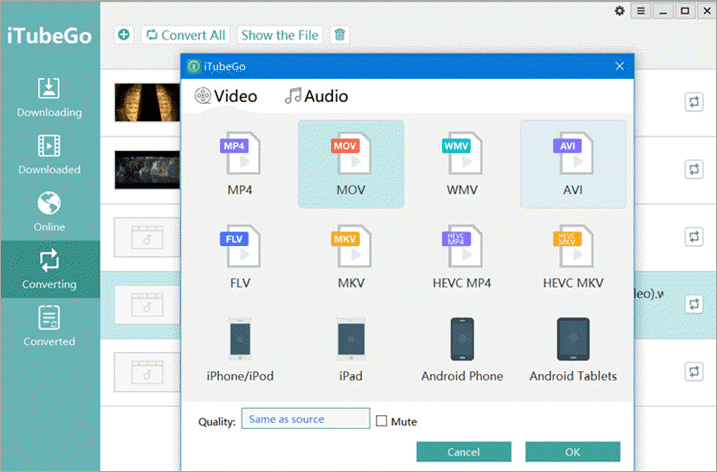
iTubeGo is a YouTube downloader for Windows, Mac, and Android devices. It has video and audio conversion functionalities. You will be able to convert audio and video files to more than 20 formats. It will let you convert the videos in formats that are suitable for various devices such as iPhone, iPad, iPod, and Android.
Features:
- iTubeGo will let you download YouTube videos, playlists, and channels.
- It supports the bulk downloading of videos.
- It supports more than 10000 websites to download videos including, Facebook & Instagram.
- iTubeGo provides the features to protect your video privacy.
Cons:
- No such cons to mention.
Verdict: iTubeGo is an audio and video downloader with conversion capabilities. It will let you download the videos in various SD and UHD video qualities such as 4K, 480p, etc. It provides 10X faster downloading of videos.
#23) DeepSwap
Best for Personal use, small to large businesses.
Price: DeepSwap can be used for free with limited features. Its monthly plan will cost you $9.99/month. Its yearly plan will cost you $49.99.
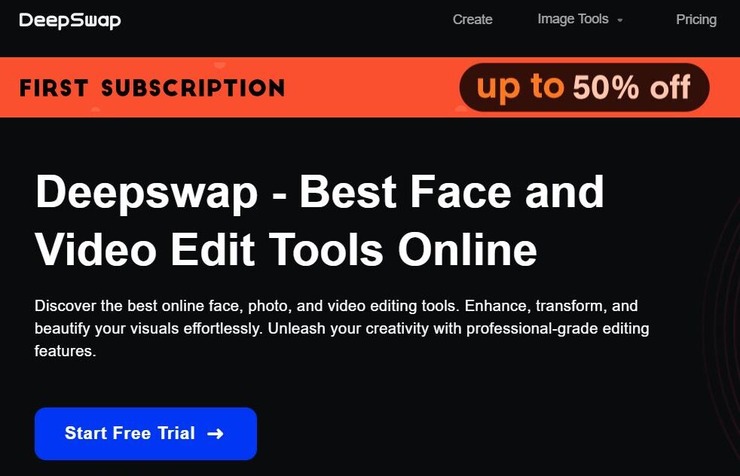
DeepSwap represents the very best of what a video editor powered by an AI can do. DeepSwap comes equipped with an advanced AI face-changing technology. This AI will notice the faces in a video and edit them for more clarity in no time. You can also use the software to swap a face in the video in just a couple of quick steps.
Features:
- AI Photo Enhancer
- AI Background Remover
- Meme and GIF Editor
- Movie role-play video editor.
Cons:
- The free plan is very limited in its video editing capabilities.
Verdict: DeepSwap is not your typical video converter. However, if you want a software that can enhance the quality of your video by editing the faces depicted in it, then this tool could be worth a try.
Frequently Asked Questions
What exactly is Video Converter Software?
Video conversion tools let you convert the storage format of videos. Video storage formats describe the output structure of the video. The format typically defines the code for the compression of the video. These tools can process and convert videos from one storage standard to another.
How does a Video Conversion Tool Work?
Video conversion tools convert videos using two methods. The first method involves changing the container format without making any changes in the video. The other method involves compressing the video using a process known as transcoding.
What are the general features of Video Converter Software?
Video conversion applications can convert the file format so that the file size is reduced or it can be opened on a particular media player. The software can process different input and output file formats. They can convert one video format to another format or change them into an audio file.
The best software supports batch processing. This feature allows you to convert a large number of videos at the same time. Moreover, you can edit video conversion format, resolution, codec, and bitrate.
Who can use Video Converter Software?
This software can be used for professional video editing and home video editing. Commercial studios generally use pricey video conversion software that contains advanced format conversion options.
Suggested reading =>> Top competitors to Windows Movie Maker
Conclusion
Video conversion tools can convert videos to different formats to reduce file size and optimize for mobile devices or online sharing. Freelancers have many different options to select a free video conversion tool.
Suggested reading =>> Best tools to convert AVI format to MP4
The best free versions include AVS Video Converter, Any Video Converter, Freemake Video Converter, and HandBrake. Commercial studios can select the paid version of these tools.
The best-paid tools include Wondershare Uniconverter, Movavi Video Converter, and NCH Prism Video Converter tool. You can select the one that best meets your requirements.
Recommended Reading =>> Wondershare Video Converter Review
Research Process
Time taken to research and write this article: 10 hours
Total Tools researched: 11
Top Tools shortlisted: 5
Was this helpful?
Recommended Reading
-

This Wondershare Video Converter review covers its features, installation steps & key differences between Wondershare UniConverter 11 & 12: Having an effective video converter by your side means that you now have the power to play any kind of video, on any type of device at your disposal. No other…
-
Select among the top-rated WebM To MP4 Converter Software comparing their features, pricing, platforms supported, etc.: WebM is a video file format that was released in 2010. It is an open-source format that was developed originally by Matroska, Xiph, and On2, and later updated by Google. The format supports video…
-
A Complete Hands-On Review of Wondershare Uniconverter. UniConverter is an Easy To Use, Free, Online Video Converter by Wondershare With Many Useful Features: "LIMITLESS And ULTIMATE" Are The Two Best Terms To Describe Uniconverter. UniConverter is the software with limitless possibilities that it can perform. Whether you want to just…
-
Want to know how to improve video quality? Read this review to find out about the best Video Quality Enhancer Software for optimizing image and audio quality: Video enhancer software can increase the quality of the videos. You can use the video quality enhancer app to increase the quality of…